
Changelog
Follow up on the latest improvements and updates.
RSS
Hemos añadido una nueva funcionalidad para que puedas crear, editar y guardar plantillas antes de enviarlas a validación por Meta.

¿Qué puedes hacer ahora?
- Guardar plantillas en estado “Borrador”, lo que te permite trabajar a tu ritmo sin tener que completar todos los campos obligatorios de inmediato.
- Editar esos borradores tantas veces necesites antes de enviarlos.
- Cuando el borrador esté listo, enviarlo a validación para que Meta lo revise.
Pasos rápidos:
- Crear borrador: nombre + idioma mínimo requerido → guardar.
- Editar borrador existente: en la lista de plantillas, selecciona “Editar”.
- Cuando esté listo, completar todos los campos obligatorios + validar variables/botones → enviar a revisión.
Buenas prácticas sugeridas:
- Usa los borradores para experimentar con distintos estilos de mensaje antes de enviarlos.
- Pon nombres descriptivos a tus plantillas para encontrarlas fácilmente más adelante.
- Completa los ejemplos de variables con datos reales: esto acelera el proceso de aprobación de Meta.
Puedes ver más información en nuestro
🚀 Seguimos mejorando para que trabajar con Adereso sea cada vez más simple y potente.
¡Gracias por tu feedback y por ser parte de esta evolución!
¡Nos alegra tenerte por aquí! 👋
Lanzamos una vista renovada de Departamentos dentro de Administrador para que gestionar equipos sea más claro, rápido y ordenado. Trae una navegación más limpia y acciones guiadas para editar con menos clics.

¿Qué cambia?
- Dos modos de visualización:
- Por departamento:ves cada departamento y sus usuarios, con filtros rápidos.
- Por usuario:lista todos los agentes y a qué departamentos pertenecen; ideal para auditorías y ediciones puntuales.
- Historial de cambios: quién modificó qué y cuándo.
- Topes de asignación por departamento, editables desde la misma pantalla.
- Cambios masivos sobre múltiples usuarios: añadir, reemplazar o eliminar departamentos en una sola acción.
Acceso rápido
Ve a Administrador → Departamentos y elige la pestaña que necesites (Por agente o Por departamento). Recuerda: el departamento principal es el que prima para las asignaciones; puedes definirlo por usuario.
¿Te animas a probarla? 👀
Esperamos que esta actualización te haga la vida más simple al gestionar tu equipo 💙
¡Qué gusto verte por aquí! 👋
Traemos novedades para quienes gestionan WhatsApp Business desde Adereso 🚀

Agrupamos y simplificamos todo en un módulo BSP para que revisar tus números y crear/administrar plantillas HSM sea más fácil, con una experiencia guiada y previsualización en tiempo real.
¿Qué puedes hacer ahora?
- Ver tus WABA conectados y el detalle de números: estado, calidad y si están correctamente vinculados a Desk.
- Buscar y filtrar números y plantillas por nombre, categoría, estado y fecha.
- Sincronizar con Meta si creaste plantillas desde Business Manager.
- Crear nuevas plantillas HSM (Marketing o Utility/Servicio) con estructura validada:
- Encabezado (texto, imagen, documento o video)
- Cuerpo con variables dinámicas {{1}}, {{2}}… (hasta 1024 caracteres)
- Botones: CTA (visitar sitio, llamar o código de oferta) y Respuestas rápidas (hasta 3)
- Pie de página opcional
- Previsualizar el mensaje mientras lo diseñas y enviarlo a aprobación de Meta.
Requisitos: tener un número cuyo BSP sea Adereso y rol Administrador en Desk.
¿Te animas a probarlo? 👀
Esperamos que esta actualización te haga la vida más fácil 💙
¡Hola! 👋 ¿Cómo estás?
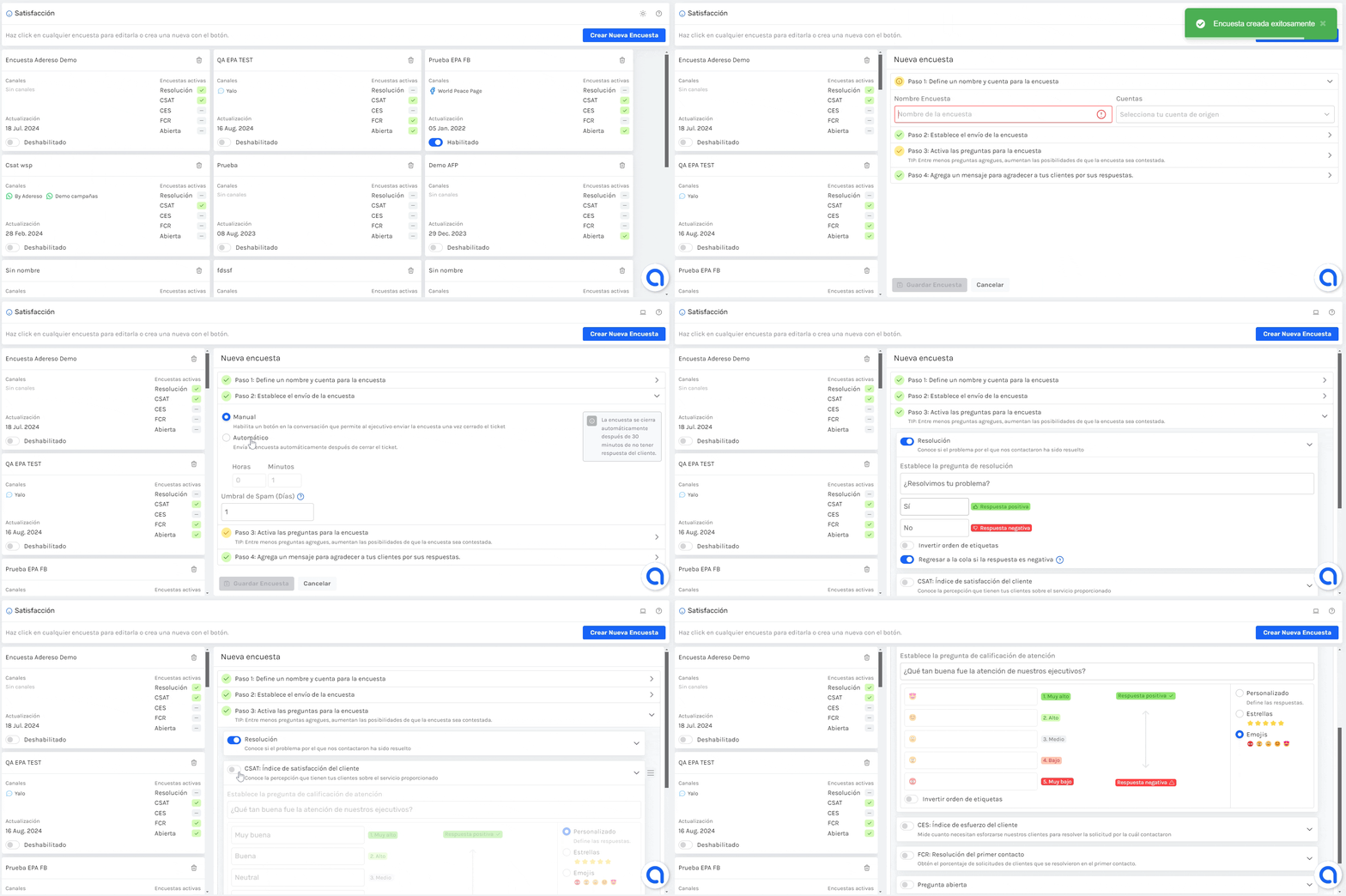
Tenemos novedades en la sección de Satisfacción ⭐
Rediseñamos el módulo para que sea
más amigable
crear tus encuestas y agregamos la opción de reordenar las respuestas de todas
tus preguntas como estimes conveniente 🤗¿Ya lo probaste? 👀
Esperamos que esta actualización sea de valor para ti💙
¡Hola! 👋 ¿Cómo estás?
Tenemos una nueva funcionalidad en Acciones masivas 🤩
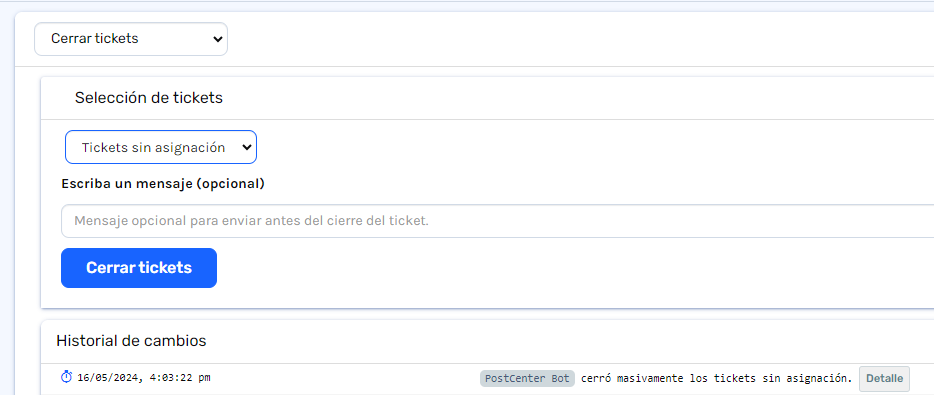
Desde hoy puedes cerrar todos los tickets sin asignar que tengas en tu bandeja de entrada de manera masiva.
Para el cierre, podrás agregar un mensaje personalizado que se enviará previo al cierre del ticket.
Puedes probarlo desde ya, entrando a ⚙️Administrador/ 🔧Acciones masivas y seleccionando:
-->Cerrar tickets --> Tickets sin asignación
Esperamos que esta nueva funcionalidad sea de gran utilidad.
¡Gracias por ser parte de nuestra comunidad!, que tengas un día genial 💫
¡Tenemos noticias en el módulo de Campañas!
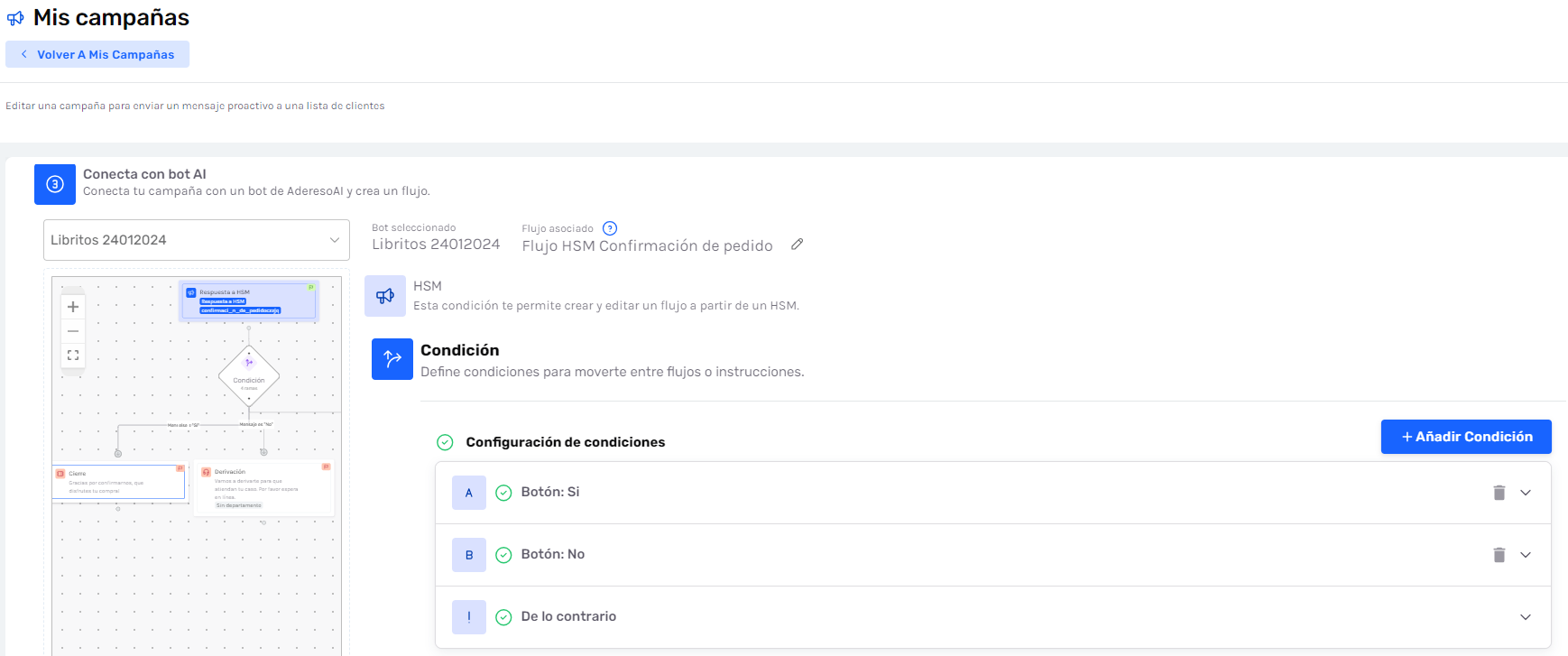
Ahora puedes enviar una campaña y conectarla a un bot con un flujo determinado, lo que te permitirá:
- Dar instrucciones específicas a un botpara que gestione los tickets originados de la campaña según indiques 🤖
- Crear campañas con un flujoautomatizado end-to-end💯
Si quieres más información, haz click aquí. 👈
¡Gracias por tu atención, que tengas un excelente día!
¡Buenas noticias, equipo de Adereso! 🥳
Nos complace anunciar una actualización que hará que iniciar sesión en nuestra aplicación sea tan fácil como un "clic". Presentamos el Single Sign-On (SSO) con Google y Microsoft. 🌐🔑
Ahora puedes acceder a Adereso con la misma cuenta de Google o Microsoft que usas a diario. Sí, así de sencillo. 🙌
Solo asegúrate de que el email de tu usuario en Adereso sea el mismo con el que inicias sesión a través de SSO. 📧✅
Dile adiós a las contraseñas olvidadas y hola a un acceso más rápido y seguro. 🚀
¡Esperamos que disfrutes de esta nueva función tanto como nosotros disfrutamos creándola para ti! 💙
¡Hola! 👋 ¿Cómo estás?
¡Te traemos una excelente noticia! ✨
Desde hoy podrás visualizar las reacciones y respuestas a mensajes en tus canales de
Instagram
y Facebook
directamente desde el ticket 😎🧑💻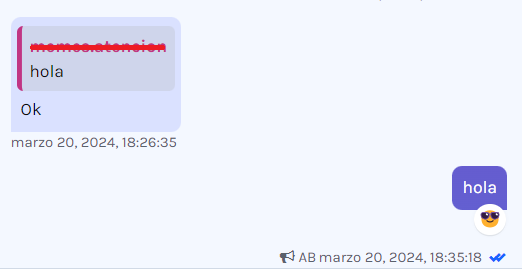
Esperamos que este cambio te ayude en el día a día 💙
¡Gracias por ser parte de nuestra comunidad!💫
¡Hola! 👋 ¿Cómo estás?
Desde hoy tienes acceso a una nueva vista de Clientes 👥. Puedes ingresar desde Clientes/ Nueva vista Clientes.
Desde esta ección podrás filtrar 🔍 a tus clientes por canal y por fecha de creación y hacer una exportación de tus contactos de manera simple.
Para ver más información, haz click aquí
¡Gracias por ser parte de nuestra comunidad!, que tengas un día genial 💫
¡Hola! 👋 ¿Cómo estás?
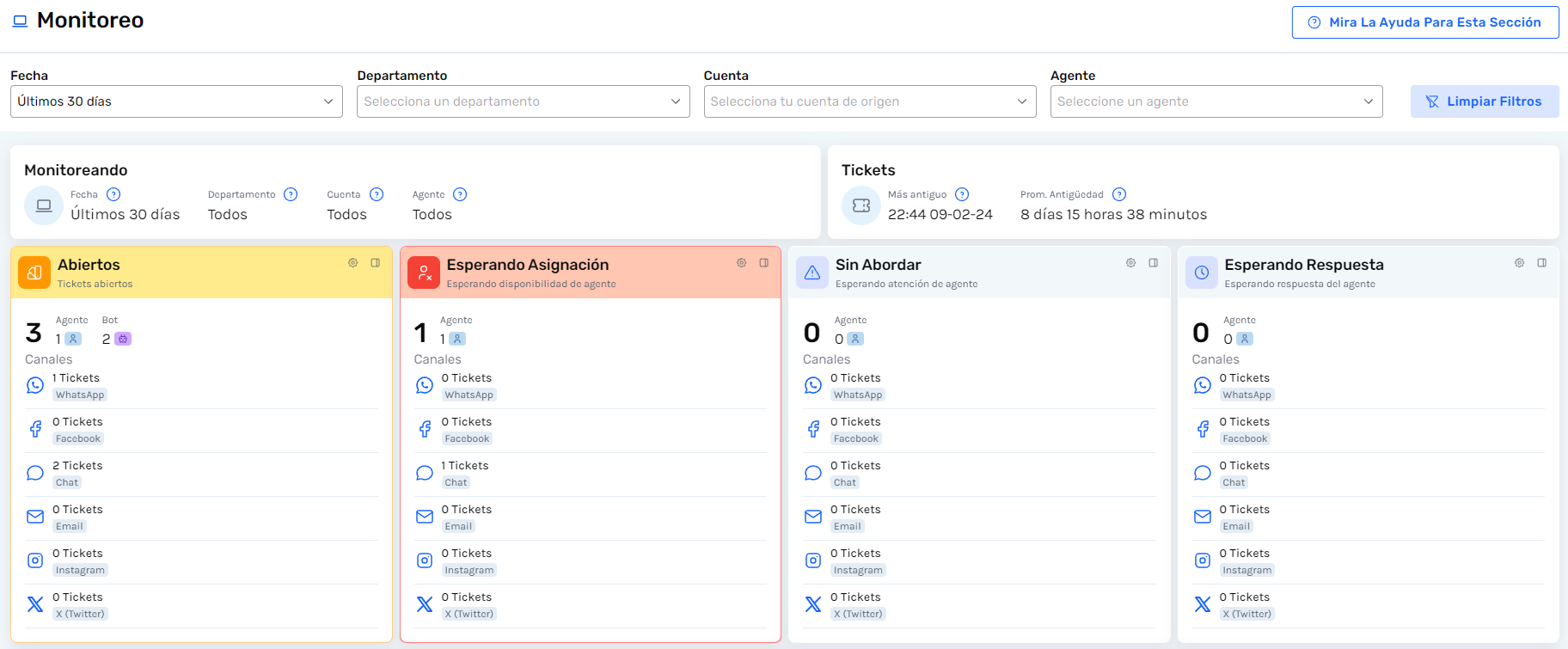
Te cuento que hemos actualizado la vista de
Monitoreo 2.0
(Analítica) con lo siguiente: - Nuevo diseño para ver la información de manera más organizada y amigable.
- Agregamosfiltrospor:Departamento, CuentayAgente.
- Ahora podrás configurar alertasde colores por métrica (amarillo 🟡 y rojo 🔴 por cada una).
- También agregamos la información de cuántos tickets se encuentran en bot y cuántos en agentes, y las métricas de Sin abordary deEsperando respuestafueron corregidas considerando solo los tickets sin abordar o esperando respuesta por parte de agente humano.
Esperamos que te gusten los cambios💙
¡Gracias por ser parte de nuestra comunidad!, que tengas un día genial 💫
Load More
→